My video website opens from any laptop. But my database connection times out until I connect to the company VPN. How can a public website use a database the public cannot reach?
I know how to write the backend. The missing part is deciding where it runs, who can connect to it, and how developers change it without opening everything to the internet.
I start with a small video-sharing app at example.com, hosted on AWS. Viewers need to watch videos, creators need to upload them, and developers need to maintain the service. Each needs different access. Those differences will shape the network.
Open the homepage on one server#
One EC2 instance (a virtual server) runs the app: / serves the homepage, /watch the video page, and /api the API (HTTP endpoints called by the frontend). These can share one application. The instance also needs a VPC and subnet; I define those when separating the database.
When I open https://example.com, the browser needs an IP address (a network destination). DNS (the system that looks up names) helps resolve example.com to one. The browser then connects to the destination and sends an HTTP request.
The browser connects to the public server on TCP 443. Returned HTML and browser code load the page; /api/videos supplies published metadata. The browser calls the app, not its database. The packet-level walkthrough goes deeper; the exchange below shows this request.
Expand the DNS lookup, TCP setup, and TLS handshake
I’ll follow a fresh HTTPS connection using TCP (reliable, ordered delivery) and TLS 1.3 (encryption and server authentication). The three-way handshake belongs to TCP: SYN, SYN-ACK, ACK. These messages agree on starting sequence numbers; they do not encrypt anything. TLS then makes its own exchange over that TCP connection. TCP connection establishment
Here I assume no cached DNS answer, no existing connection, and a full TLS 1.3 handshake with a server certificate. Resumption, early data, a retry, and client certificates would change the exchange. TCP acknowledgments during TLS, compatibility messages, and connection closing are omitted. HTTP/3 uses QUIC over UDP instead of this TCP setup.
The hello messages exchange public key material; the private keys are not sent. Messages after ServerHello are encrypted. The certificate identifies the server, CertificateVerify proves control of its private key, and Finished checks the handshake. HTTP then travels with application traffic keys. This diagram shows the ordinary server-authenticated flow, not a TLS guarantee that every handshake has exactly these messages. TLS 1.3 message flow
DNS helps find the destination. It does not carry the page request or grant permission to enter.
An IP address gets us to a host; a port (a numbered destination for a service) helps its operating system deliver traffic to the right program. Think of a building address and a particular office inside it.
| Destination port | What might be listening there | Who needs it in this example? |
|---|---|---|
| TCP 443 | HTTPS website | Anyone visiting example.com |
| TCP 22 | SSH, an encrypted remote shell | Authorized operators, if enabled |
| TCP 5432 | PostgreSQL database | Video app and approved developers |
| TCP 8443 | Our internal HTTPS service | The public entry point |
These are conventions and choices, not guarantees. A program can listen on a different port. Moving Postgres to an unusual number doesn’t make it private.
A video page needs metadata, not database access#
EC2 makes the server, interface, and port explicit. ECS on Fargate (managed container execution) could instead run a containerized backend. I would still choose subnets, security groups, roles, and load-balancer integration. Fargate networking
PostgreSQL stores channels, titles, ownership, and publication status. GET /api/videos/42 fetches watch-page metadata; changing its title requires the uploader’s permission.
The database stores structured records, not video bytes. The backend queries it and returns HTTP data; the browser needs no database password.
I could initially run both programs on one machine, with Postgres listening only locally. One server, a public IP, HTTPS on 443, and a firewall rejecting other inbound connections can be a valid beginning.
Publicly reachable does not mean every port is open. And accepting an HTTPS connection does not mean accepting every request inside it.
One machine now serves pages, holds credentials, stores metadata, and accepts administration. A break-in or failed update can affect all four. I separate them to limit that damage.
I move the database to its own managed resource, then put a public entry in front of the application. These are different callers and different interfaces:
flowchart TB
    U[Anyone on the internet]
    subgraph public[Public entry]
      E[HTTPS entry point]
    end
    subgraph private[Private work]
      S[Video app]
      D[(Metadata database)]
    end
    U -->|HTTPS 443| E
    E -->|HTTPS 8443| S
    S -->|Postgres 5432| D
    U -.->|5432 blocked| D
    linkStyle 0,1,2 stroke:#2f9e68,stroke-width:2px
    linkStyle 3 stroke:#d64545,stroke-width:2px
    classDef entry fill:#3178c618,stroke:#3178c6,stroke-width:2px
    classDef work fill:#2f9e6818,stroke:#2f9e68,stroke-width:2px
    classDef data fill:#9263c618,stroke:#9263c6,stroke-width:2px
    classDef rejected fill:#d6454518,stroke:#d64545,stroke-width:2px
    class U,E entry
    class S work
    class D data
    style public fill:transparent,stroke:#777e88,stroke-width:1.5px
    style private fill:transparent,stroke:#777e88,stroke-width:1.5px
Blue boxes mark the public side, green the application, and purple the data. Green arrows are allowed paths; red dashed arrows are blocked attempts. The browser gets video metadata without a database connection.
This is least privilege (giving each caller only the access its job needs). The separation reduces the damage one compromised component can cause. It doesn’t make that component impossible to compromise.
Give the private machines their own address space#
The app needs to reach Postgres. Once a public entry forwards requests, neither backend needs a public IP.
A VPC (virtual private cloud) is an isolated virtual network within one AWS Region. I control its address ranges, routes, and network rules; AWS runs the underlying hardware. Azure’s equivalent is a VNet. AWS’s VPC model
I choose 10.20.0.0/16 for this example. CIDR (a compact way to write an address range) uses the number after the slash to say how many leading bits are fixed.
IPv4 address: 32 bits

10.20.0.0/16
└─ 16 fixed bits ─┘  16 bits available to vary

Range: 10.20.0.0 through 10.20.255.255
Size:  2^16 = 65,536 addresses

A smaller slice:
10.20.21.0/24 → 10.20.21.0 through 10.20.21.255
                         2^8 = 256 addresses
These are address counts, not usable server counts; AWS reserves some addresses in each subnet. 10.0.0.0/8 is private address space: the public internet doesn’t route it to my VPC. Another company can use the same addresses inside its own network. If we later connect those networks, overlapping ranges become a problem. AWS subnet addressing
A private address isn’t a password. A machine that gains a permitted network path can attempt a connection. I still need rules about who may connect and what they may do.
A subnet is a slice, not a locked room#
A subnet is a slice of the VPC’s address range with its own routing and subnet-level rules. It belongs to one Availability Zone (a separate failure location within a Region); a VPC can span several zones. AWS subnet boundaries
An instance’s network interface (its virtual network attachment) gets an address from its subnet.
A tier is a job; a subnet is an address range. Our three tiers are public entry, private application logic, and private data. I give each tier subnets in two zones:
| Job | Zone A | Zone B | What lives here? |
|---|---|---|---|
| Public entry | 10.20.0.0/24 | 10.20.1.0/24 | Load balancer connections |
| Private application | 10.20.10.0/24 | 10.20.11.0/24 | Video app instances |
| Private data | 10.20.20.0/24 | 10.20.21.0/24 | Database deployment |
Separating jobs lets me give them different rules; separating zones helps survive a failure. Two subnets in one zone provide no zone redundancy.
The /24 ranges are examples, not a sizing rule. I leave room for growth and deployments that briefly run old and new instances together.
Sizing subnets: reserved addresses, containers, and ALB headroom
Each /24 has 251 assignable IPv4 addresses after AWS’s five reservations. I budget for peak instances, overlapping deployments, and service interfaces. ECS tasks using awsvpc each need an interface; EKS (managed Kubernetes) commonly gives VPC addresses to pods (running container groups). Busy container tiers may need larger ranges: an existing subnet’s CIDR cannot be resized. Subnet sizing, EKS address planning
The load balancer also needs room to grow. AWS requires its ordinary Availability Zone subnets to be at least /27, with at least eight free addresses in each. A small public tier still needs spare capacity. ALB subnet requirements
Different subnets do not automatically block communication. The VPC’s local routes normally connect them; firewall rules must restrict access.
A public subnet needs a route, not a public-sounding name#
A route table (destination ranges and where to send their packets) answers: “For this address, which way?”
An internet gateway (the VPC’s connection to the internet) provides an internet path. A subnet with a direct route to it is called public. For direct IPv4 internet communication, a resource also needs a public IPv4 address or mapping and permissive firewall rules. A route alone does not expose every machine. AWS route tables
Here is my example’s routing plan:
| Subnet’s table | Destination | Send to |
|---|---|---|
| All three tiers | 10.20.0.0/16 | Local VPC routing |
| Public entry | 0.0.0.0/0 | Internet gateway |
| Private application | 0.0.0.0/0 | Outbound gateway, added when needed |
| Private data | Other destinations | No default internet route |
0.0.0.0/0 matches every IPv4 address. A more specific matching route wins: a request to 10.20.21.15 uses the /16 local route, not the /0 internet route.
Let the front door forward the work#
An instance can fail. I run app copies in two zones behind a load balancer (an entry point that distributes requests across servers). AWS’s Application Load Balancer, or ALB, routes HTTP requests and checks target health. ALB behavior
I create a Route 53 alias record (a DNS record that follows an AWS resource) for example.com pointing at the ALB, rather than copying its current IP addresses. I obtain a certificate for example.com through ACM (AWS Certificate Manager), validate domain control, attach it to the ALB, and configure its listener, the rule for handling connections on port 443. Its target group (the set of backends eligible to receive requests) contains our private app instances on 8443. Route 53 routing to a load balancer, HTTPS listener certificates
flowchart TB
    B[Browser]
    subgraph V[Production VPC · 10.20.0.0/16]
      subgraph P[Public subnets · Zones A and B]
        L[One logical ALB across both zones]
      end
      subgraph A[Private application subnets]
        SA[App · Zone A]
        SB[App · Zone B]
      end
      subgraph D[Private data subnets]
        DB[(Postgres primary)]
        ST[(Standby in other zone)]
      end
      L -->|HTTPS 8443| SA
      L -->|HTTPS 8443| SB
      SA -->|Postgres 5432| DB
      SB -->|Postgres 5432| DB
      DB -->|Replication| ST
    end
    B -->|HTTPS 443| L
    linkStyle 0,1,2,3,4,5 stroke:#2f9e68,stroke-width:2px
    classDef entry fill:#3178c618,stroke:#3178c6,stroke-width:2px
    classDef work fill:#2f9e6818,stroke:#2f9e68,stroke-width:2px
    classDef data fill:#9263c618,stroke:#9263c6,stroke-width:2px
    classDef rejected fill:#d6454518,stroke:#d64545,stroke-width:2px
    class B,L entry
    class SA,SB work
    class DB,ST data
    style V fill:transparent,stroke:#777e88,stroke-width:1.5px
    style P fill:transparent,stroke:#777e88,stroke-width:1.5px
    style A fill:transparent,stroke:#777e88,stroke-width:1.5px
    style D fill:transparent,stroke:#777e88,stroke-width:1.5px
The same colors mark public entry, application work, and data. This is a logical request map; the internet gateway and route tables provide its paths. The standby is for database failover, not a second writable database.
The video app still serves /, /watch, and /api; the ALB forwards requests. Browser → ALB, ALB → app, and app → Postgres are three separate connections. Only the first needs a public destination.
HTTPS on the backend leg encrypts it, but ALB does not validate the target’s certificate. This is not the browser’s hostname-and-certificate check repeated at the next hop. ALB target TLS
The backend sees the ALB’s connection. I accept the original client IP from X-Forwarded-For only through trusted proxies. Each connection also has its own idle timeout: ALB defaults to 60 seconds. Keeping the backend timeout longer avoids a race where ALB reuses a connection the backend has closed, producing a 502. Forwarded headers, ALB idle timeout
I use RDS (managed relational database hosting) with public accessibility disabled and a database subnet group covering both zones. A Multi-AZ deployment enables failover; two listed subnets alone do not create replication. The app uses the database DNS endpoint because failover can change its IP. RDS in a VPC
After failover, the app must discard broken pooled connections and resolve the database endpoint again. For Java, AWS recommends a DNS cache lifetime of at most 60 seconds; indefinite caching can keep sending connections to the old IP. RDS failover and DNS
Two zones are my choice for this web tier and primary/standby database, not a rule for every distributed service. In a three-voter system split two-and-one, losing the zone with two voters removes the majority. Its failure placement needs a different design. Two zones also aren’t regional disaster recovery: I still need backups, tested restores, and enough surviving capacity.
A route says where. A firewall says whether.#
Now I can reach the right machines internally. I don’t want every internal machine to reach every service.
A security group is a firewall on a supported resource’s network interfaces. Its rules match addresses or groups, protocols, and ports. It is stateful (allowed connections automatically admit their replies). It cannot distinguish reading a video from deleting it. AWS security groups
I attach separate groups to the ALB, app, and database. These inbound rules assume no other attached group grants broader access:
| Group | Allow inbound from | Destination port | Meaning |
|---|---|---|---|
entry-sg | 0.0.0.0/0 | TCP 443 | Anyone can reach the web entry |
app-sg | entry-sg | TCP 8443 | Only the entry’s interfaces can reach the app |
database-sg | app-sg | TCP 5432 | Only the app can start database connections |
The corresponding outbound policy allows entry to app on 8443 and app to database on 5432. Health checks use the permitted backend port here. Other dependencies need deliberate rules of their own.
The process must actually listen on the interface the ALB reaches. Binding the backend only to 127.0.0.1 makes it local to that machine. Listening on 0.0.0.0:8443 with TLS accepts connections on its IPv4 interfaces; it does not assign a public IP or bypass the security group. The route, firewall, and running program all have to agree.
ALB -- HTTPS 8443 --> app interface -- accepted socket --> backend
                         |                                  |
                    app-sg allows?                    listening here?
A running instance is not necessarily a ready application. I configure an ALB health check such as /health/ready on the backend port, allow its traffic, and monitor target health. Health checks guide routing; they are not an access-control boundary. If all registered targets are unhealthy, ALB can route to all of them rather than block all requests. ALB health checks
Referencing app-sg follows its associated interfaces as app IPs change. It neither authenticates a Java process nor inherits that group’s rules. A compromised app server retains its allowed network access. Security group references
Security groups combine allow rules; they have no explicit deny. One broad rule in any attached group can defeat the others’ restrictions.
Why an ACL needs a rule for the reply#
A network ACL (access control list) filters packets crossing a subnet boundary. AWS’s diagram shows where that filter sits relative to the security groups:
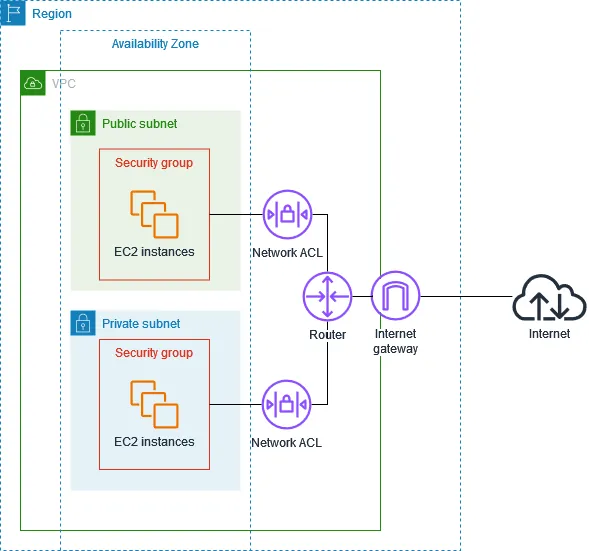
Source: AWS — Infrastructure security in Amazon VPC.
The red outlines associate security groups with resources; they are not extra subnets. Cross-subnet traffic encounters both filters. Same-subnet traffic still encounters security groups, but not the NACL. The gateway drawing alone does not give the private subnet an internet route.
Unlike security groups, NACLs are stateless (each packet is checked independently). They allow or deny by numbered rules, stopping at the first match. A permitted request does not automatically permit its reply. AWS network ACLs
Suppose the app opens a database connection from temporary port 51000:
Port 5432 belongs to the database listener. Port 51000 belongs to this client’s connection. Replies reverse the source and destination.
A security group recognizes this as response traffic. A restrictive ACL needs matching return-path rules; an outbound rule allowing only destination 5432 would not allow this reply. Real rules cover the appropriate ephemeral port range (temporary ports chosen by clients), not just 51000. Both subnets’ ACLs matter. AWS ACL examples
I use security groups for precise service relationships. An ACL can add a subnet-wide guardrail, but duplicating every rule there adds another place to break the return path.
| Connection question | Security group | Network ACL |
|---|---|---|
| Where does it apply? | Supported resource interfaces | Traffic entering or leaving a subnet |
| Can it deny explicitly? | No; allow rules combine | Yes; lowest-numbered match wins |
| Does a permitted request permit replies? | Yes, through connection tracking | No; check the reverse direction separately |
| Can it separate two instances in one subnet? | Yes, with suitable group rules | No |
| What do I use it for here? | App-to-database permission | Additional subnet-wide restrictions |
Every subnet has an associated NACL. I can leave the default allow-all NACL while enforcing workload access with security groups; a new custom NACL starts by denying traffic. Tightening it is an extra responsibility, not a replacement for the resource rules. NACL defaults and evaluation
A working connection does not grant access to an unpublished video#
Alice owns an unpublished video. Bob changing the URL to /api/videos/42 must not reveal its private metadata or issue him a playback grant.
A packet filter sees addresses, protocols, and ports. It cannot decide whether the caller may view an unpublished video.
| Check | Question it answers | What it cannot establish |
|---|---|---|
| IP routing, network layer | Is there a path to this destination? | Whether I should use it |
| SG / ACL, network and transport fields | May this connection pass? | Whether this video is public |
| TLS | Is this connection encrypted to the checked server? | Permission to view a private video |
| Application authentication | Which user is calling? | Permission to every user’s data |
| Application authorization | May this user view this video? | Whether another service is safely configured |
| Database grants | May this DB role run this SQL operation? | The end user’s identity unless the app carries it through |
| Cloud IAM | May this principal perform this cloud API action? | An automatic route or ordinary database login |
IAM (identity and access management) controls actions such as changing infrastructure or reading cloud storage. Permission to modify an RDS instance isn’t automatically permission to query its tables. IAM database authentication is a separate, explicitly configured feature, and database privileges still matter. AWS IAM
The connection succeeded; application authorization refused the operation. Those are separate decisions.
The app needs its own identity too#
Alice’s session identifies a person to our app. An IAM role (permissions a workload can use with temporary credentials) identifies the app to AWS. These are different identities: the cloud role does not tell Postgres which videos Alice owns.
I put the database password in Secrets Manager and let the app’s IAM role read only that secret. The app also needs a network path to Secrets Manager. Postgres separately checks the retrieved password and SQL permissions. Secret access policies
Uploading a video should not occupy the web server#
A video can be gigabytes; its title is a few words. Proxying uploads through the app consumes its bandwidth and connections. I store video bytes in S3 object storage (files addressed by keys in buckets), using separate raw and processed buckets. Postgres keeps ownership, status, and object references.
The browser first calls POST /api/uploads. The app authenticates the creator, checks the upload allowance, allocates a new video ID and object key, and returns a presigned URL (a temporary grant for a specific S3 operation). The browser uploads directly to S3 using that URL.
A presigned URL grants one operation on one key, not the app’s secret credentials or bucket-listing access. It is a bearer credential (possession grants access) and may be reused while valid. Temporary signing credentials can expire before the requested URL lifetime. I use short expirations, unique keys, and verify the uploaded object before processing. S3 presigned uploads
Multipart upload (uploading an object in pieces) lets failed pieces retry. The backend authorizes the session and parts; abandoned uploads need cleanup. CORS (browser rules for cross-origin requests) permits our frontend to upload to S3. It does not authenticate callers or restrict non-browser clients. Multipart uploads, S3 CORS
I keep Block Public Access enabled. A public S3 API endpoint can accept our authorized upload while refusing anonymous reads. Publicly reachable is different from publicly readable. IAM and bucket policies control object actions; our application decides which creator may request a grant. S3 access controls
S3 is an AWS service; my bucket is a resource created in it. The bucket uses IAM and storage policies, not a security group. I keep object ACLs disabled with Bucket owner enforced ownership; an object ACL is a storage grant, not a network ACL. S3 Object Ownership
An upload is not yet a playable video#
Different viewers need different formats and bitrates. Transcoding (making new encoded versions of a video) is CPU-heavy work that should not run inside the upload request. I add a background worker (a program processing jobs outside the browser request) and SQS (a managed message queue) to hold work until a worker takes it.
The app verifies the upload and queues its video ID and immutable input version. A worker produces playable files and thumbnails, then reports completion through an authenticated internal API. The app validates the job and version before updating metadata. Worker authentication alone cannot authorize completing an arbitrary video.
Worker -- GetObject --> raw bucket
Worker -- encode --> output files
Worker -- PutObject --> processed bucket
Worker -- report completion --> internal video API -- SQL --> metadata
Worker -- DeleteMessage --> queue
Standard SQS may deliver a job twice. Processing must be idempotent (safe to repeat): use versioned output keys and guard metadata against duplicate completion. I durably record pending jobs and retry interrupted submission; a database update and queue write are not atomic. SQS delivery behavior
Long encodes need suitable visibility timeouts (how long a received job is hidden from other workers), extended while work continues. Failed jobs get bounded retries and a dead-letter queue (jobs set aside for investigation). I monitor the oldest waiting job, not merely whether a worker is running. SQS visibility
Workers can run on EC2 or containers. MediaConvert is the managed alternative: I submit jobs and grant its role access to selected inputs and outputs. AWS runs the processing fleet outside my own worker instances. MediaConvert, AWS video-on-demand design
The encoder should not inherit the web app’s access#
Segmentation (separating parts and controlling communication) gives the entry, app, and database different access rules. Microsegmentation separates individual workloads: the app may query Postgres; the encoder may not. These are design patterns, not AWS products or fixed synonyms for NACLs and security groups.
Video app [app-sg] -- SQL 5432 ------------------> metadata DB
Video worker [worker-sg] -- SQL 5432 ------------> BLOCKED
Video worker -- authenticated completion API ---> video app
Video worker -- scoped object operations -------> video buckets| Workload | Permitted path | Separate permission required |
|---|---|---|
| Web app | Metadata DB on 5432 | App SQL role; no schema-administration grant |
| Video worker | S3 and SQS over HTTPS | Read raw inputs, write restricted outputs, consume processing jobs |
| Worker → internal app | HTTPS 8443 from worker-sg | Worker identity may report completion only |
| Worker → metadata DB | No DB SG allow rule | No database credential issued |
I add an inbound app-sg rule for worker-sg on 8443, and matching worker egress. The database still accepts only app-sg. The public ALB listener rejects /internal/* before its ordinary forwarding rule; the app also authenticates and authorizes internal callers. An internal-looking URL is not protection.
Polling needs outbound access; the stateful SG admits replies. An SG cannot distinguish processes sharing one interface, so isolation needs separate workload interfaces or another enforcement layer. The encoder still has its granted file access—broad bucket permissions would undermine the separation.
A private endpoint changes the path to S3#
The bucket does not sit inside our database subnet. An S3 gateway endpoint (a route-table target for reaching S3 privately) gives the app a path to the regional S3 service without an internet or NAT gateway. Its policy restricts that path; it does not grant access missing from the relevant identity and resource policies.
Worker -- signed S3 request --> subnet route table
                                |
                          S3 prefix-list route
                                |
                          gateway endpoint -- GetObject --> S3
                                                           |
                                                   permission checks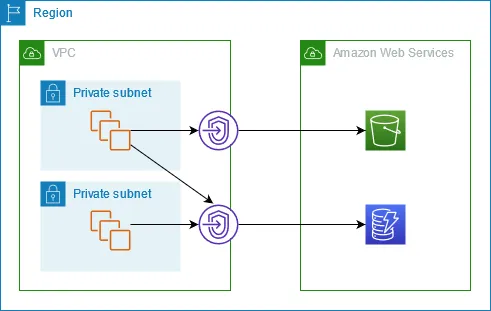
Source: AWS — Gateway endpoints. For our encoder, follow the upper path to S3; the route changes, but S3 permissions still apply.
A prefix list (a named set of IP ranges) lets the route identify S3 destinations. The endpoint does not need a security group. By contrast, an interface endpoint puts private network interfaces in selected subnets; its security group must allow the caller, usually on TCP 443. I use that model for private access to Secrets Manager or the processing queue later. S3 gateway endpoints, Interface endpoints
The worker can use this endpoint; a browser at home cannot. A bucket-wide requirement to use it would reject browser uploads, even presigned ones. Policies must account for both callers.
Pressing Play takes a different path from opening the page#
The app returns metadata and a playback location. A CDN (content delivery network) caches and delivers video bytes near viewers. Page requests and playback take different paths.
I use CloudFront at media.example.com, with the processed S3 bucket as its origin (the source it fetches on a cache miss). The homepage and API remain at example.com behind the ALB. CloudFront is another public entry with a different job, not a component inside our application subnet.
An adaptive player reads a manifest (a list of available versions and media segments) and requests short pieces at a suitable bitrate. The worker prepares those versions; the CDN delivers them. A cache miss still costs origin work, and popular content can create a burst before caches are warm. At an illustrative 4 Mb/s each, 1,000 simultaneous viewers need about 4 Gb/s of delivery; ten minutes is roughly 300 GB of payload. Caching reduces repeated origin reads, not the bytes delivered to viewers.
For a delivery-only estimate, suppose roughly 300 GB is billable in CloudFront’s US/Mexico/Canada pay-as-you-go tier at $0.085/GB: about $25.50. This assumes the monthly 1 TB free transfer allowance is already used and usage remains in the next 9 TB tier. Requests, storage, encoding, and other costs are extra; other locations and pricing plans differ. Rates checked September 2026. CloudFront pricing
I configure Origin Access Control, OAC (CloudFront authentication to the S3 origin) to always sign requests, and a bucket policy allowing reads from the intended distribution. Anonymous direct S3 reads remain blocked. The S3 bucket stays private even when a published video is watchable by everyone through the CDN. CloudFront origin access
| Decision | Public video | Unpublished or restricted video |
|---|---|---|
| App metadata API | Return published metadata | Check viewer entitlement |
| CDN viewer access | Public playback path may accept anyone | Require a signed URL or signed cookie on the restricted path |
| S3 origin access | Only intended delivery identities | Same origin restriction; OAC alone does not authorize viewers |
The app issues private playback grants only after checking permission. CloudFront verifies the grant before serving restricted content, including cached content. I keep separate public and restricted cache behaviors and protect both manifests and segments. Newly processed outputs stay on the restricted path; only an authorized publish operation makes a version available through the public path. An S3 upload URL and a CloudFront playback URL are different grants, signed and checked by different mechanisms. CloudFront private content, Signed cookies for multiple video files
Changing a public video to private also needs a delivery plan: previously public cached objects and already-issued grants do not disappear just because a database flag changed. I first close access through the old public path, then invalidate stale public copies and expire grants as appropriate. Versioned paths help avoid reusing old public URLs; downloaded copies cannot be recalled. Nor would I cache personalized API responses as public video files.
For media.example.com, I configure the CloudFront hostname and HTTPS certificate separately from the ALB. CloudFront’s ACM viewer certificate must be in us-east-1; the ALB certificate belongs in the ALB’s Region. CloudFront certificate requirements
The viewer-to-product request is north–south traffic (crossing the product’s external boundary). Calls between internal components are east–west traffic. An app-to-database request is outbound at the app and inbound at the database; “outbound” does not necessarily mean “to the internet.”
The app must sometimes call out#
File storage and job queues can use private endpoints. A third-party integration or package download may still need an internet destination. That outbound connection does not require opening an inbound administration port.
The application’s NAT gateway (a service that translates connection addresses) lets it initiate IPv4 connections outward, perhaps to fetch an update. The zonal public NAT gateway shown below translates the app’s source to its own private address; the internet gateway maps that to the NAT gateway’s public address. Replies follow the reverse mappings. It doesn’t accept unsolicited internet connections into the private server. AWS NAT behavior
The application starts this conversation. Public page requests take a different path through the load balancer; they do not come in through NAT.
One shared zonal NAT makes both zones depend on its zone for outbound access. I use one per zone and route each private subnet through its local NAT.
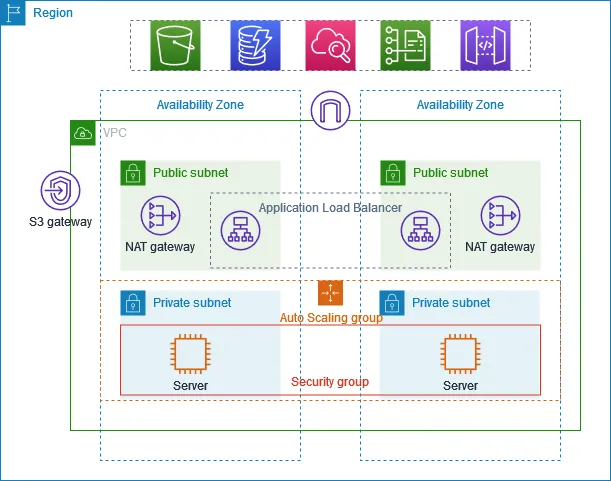
Source: AWS — Private subnets and NAT. This is the zonal layout: our Video app occupies the server positions. The Auto Scaling group manages server capacity across zones; the shared security-group outline means the same rules can apply to interfaces in both subnets.
NAT has ongoing costs. An S3 gateway endpoint avoids NAT charges for S3 traffic.
NAT costs, regional gateways, and idle connections
AWS also offers a regional NAT gateway. In automatic mode it expands across zones without a public subnet to host it. Expansion can take up to 60 minutes, with cross-zone traffic possible meanwhile. Our diagram uses zonal NAT. Regional NAT behavior
NAT also has a meter running when traffic is quiet. Using AWS’s published US East (Ohio) example rates, checked September 2026:
| Cost | Worked example |
|---|---|
| Two zonal gateways, 730 hours | 2 × 730 × $0.045 = $65.70 |
| 100 GB processed through them | 100 × $0.045 = $4.50 |
| Subtotal | $70.20, before public IPv4 and applicable data transfer charges |
Regional NAT is also billed per active zone-hour, not once for the entire Region. An S3 gateway endpoint can keep S3 traffic off this NAT path without endpoint hourly or processing fees. That saving does not apply to every kind of private endpoint. VPC pricing
An idle TCP mapping can disappear after 350 seconds; reuse then receives a reset. A pool of reusable connections therefore needs an idle policy too. NAT timeouts
NAT isn’t a web-content filter. An infected app with broad outbound access can also send stolen data outward. I would narrow outbound access and use private service endpoints where suitable. IPv6 needs its own routes and rules; an IPv4-only policy doesn’t cover it.
My laptop needs a different entrance#
The watch page works, but my laptop’s database client times out: home has no route to the private database.
Connecting a VPN (an encrypted tunnel into another network) can add that path. It doesn’t turn the database public or change its password.
Development uses a separate account and VPC, 10.30.0.0/16, with test data. Production stays in 10.20.0.0/16 with narrower access. Public users never pass through the developer VPN.
AWS Client VPN needs a target network association, routes, and authorization for the destination network. A connected tunnel alone isn’t permission to every address. With split tunneling (sending only selected destinations through the VPN), ordinary internet browsing can keep using the home connection. Client VPN networking, destination authorization
For the IPv4 VPC-subnet association model here, Client VPN translates client source addresses. I allow the VPN association’s security group into the development database on 5432, rather than assuming Postgres sees my home’s public IP or the original VPN client IP. Other attachment models differ. AWS’s explanation of Client VPN resource access
Client VPN pricing example
AWS Client VPN also charges while provisioned. Its published Ohio example is $0.10 for one endpoint associated with one subnet for an hour, plus $0.05 per active client-hour. Ten clients for that hour cost $0.60 before applicable IPv4 and transfer charges; this is not the cost of an always-on month. Client VPN pricing
The laptop also needs to resolve the database name. It may already resolve without VPN while its private IP remains unreachable. Knowing an address is not having a route.
In this lab, 10.30.21.15 holds development data and the developer has read-only SQL access. Connect the VPN, then compare SELECT (read rows) with DELETE (remove rows). The same connection and login can permit one and refuse the other.
Connect the VPN first. Then try reading and deleting with the same read-only database user.
SELECT was not sent: the VPN is off. Database permissions have not been tested yet.
10.30.21.15 : 5432
No VPN route to 10.30.21.15 from this laptop.
An earlier check stopped this attempt.
An earlier check stopped this attempt.
An earlier check stopped this attempt.
A teaching model, not a live connection. DNS, the return route, and subnet ACLs are assumed correct. VPN connected includes successful VPN authentication and authorization.
If a database works only after I connect to my work VPN, this is a plausible explanation—not proof of the exact configuration. I would inspect the resolved address, laptop routes, VPN authorization, and firewall rules to find which boundary changed.
An office network has its own VPN entrance#
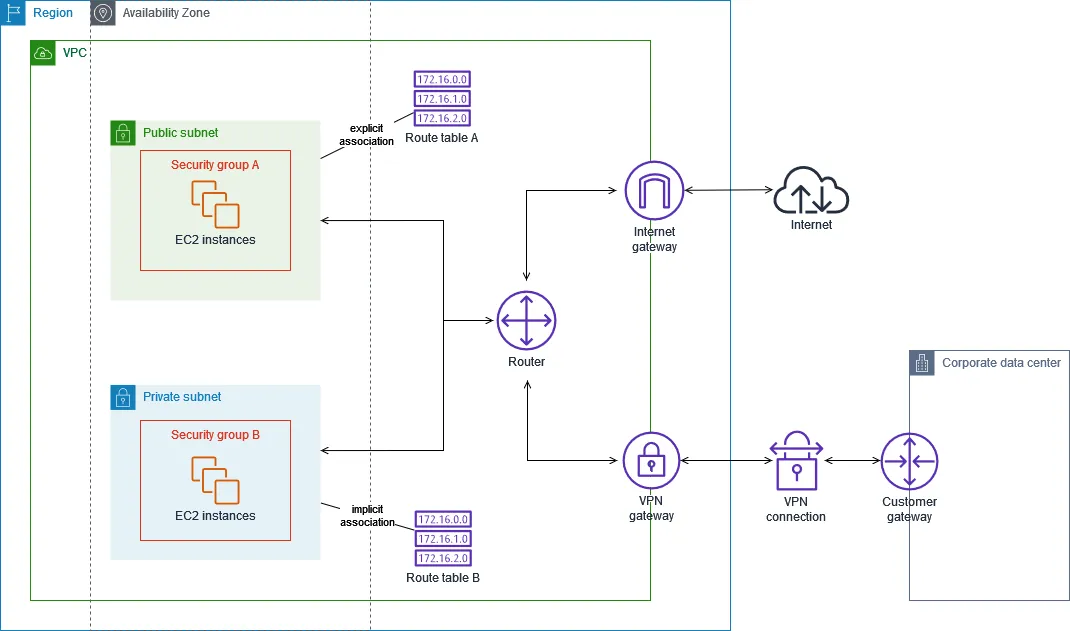
Source: AWS — Subnet route tables. This is a Site-to-Site VPN (a tunnel between networks), not the laptop Client VPN above. The customer gateway represents the office side; the virtual private gateway is the AWS side.
The association lines are configuration links, not packet paths. Subnet A explicitly selects its route table; the other subnet inherits the main table. A subnet has one associated subnet route table at a time; several subnets can share one. The small address labels are AWS’s illustration, not our video platform’s CIDRs.
One company does not mean one shared network#
I choose boundaries by ownership and risk, not one VPC per feature:
| Situation | Design I would consider | Reason |
|---|---|---|
| App and encoder for this video product | One VPC, distinct SGs and roles | Separate access without a network per feature |
| Development versus production | Separate accounts and VPCs | Development credentials should not control production |
| Independently owned second product | Separate workload accounts and VPCs | Independent policies, changes, and resource limits |
| Shared service | Explicit authenticated API and approved connectivity | Share the capability without granting blanket network access |
An AWS account is a boundary for resource ownership and cloud permissions. A VPC is a regional network boundary. They are not interchangeable; one account can contain multiple VPCs, and shared-VPC designs also exist. AWS recommends separating workloads and production/non-production accounts according to security and operational needs. Separation adds governance and connectivity work. AWS account design
A reporting team needs one private connection#
Later, a reporting job runs in a separate account and VPC, 10.40.0.0/16. It needs an approved viewing summary, not database administration. I expose an authenticated internal report operation on the video app. On the public ALB listener, a higher-priority rule returns a fixed 403 for /internal/* before the ordinary forwarding rule. The app separately checks the reporting identity, and the reporting client verifies the app’s TLS certificate. A path name alone is not protection. ALB fixed responses
VPC peering (a private network connection between two VPCs) can provide this path. It does not merge accounts, automatically install routes, or grant SQL permissions.
flowchart TB
    subgraph r[Reporting VPC · 10.40.0.0/16]
      R[Report job · 10.40.10.9]
    end
    P[Peering connection]
    subgraph v[Product VPC · 10.20.0.0/16]
      A[Private app · 10.20.10.8]
      D[(Metadata database)]
    end
    R -->|HTTPS 8443| P
    P -->|Forward packet| A
    A -->|Scoped SQL| D
    R -.->|SQL not allowed| D
    linkStyle 0,1,2 stroke:#2f9e68,stroke-width:2px
    linkStyle 3 stroke:#d64545,stroke-width:2px
    classDef entry fill:#3178c618,stroke:#3178c6,stroke-width:2px
    classDef work fill:#2f9e6818,stroke:#2f9e68,stroke-width:2px
    classDef data fill:#9263c618,stroke:#9263c6,stroke-width:2px
    classDef rejected fill:#d6454518,stroke:#d64545,stroke-width:2px
    class R,A work
    class P entry
    class D data
    style r fill:transparent,stroke:#777e88,stroke-width:1.5px
style v fill:transparent,stroke:#777e88,stroke-width:1.5px For that one connection trace, I need both directions:
| Where I configure it | Destination / permission | Why |
|---|---|---|
| Reporting subnet route table | 10.20.10.0/24 → peering | Reach the app subnet |
| App subnet route table | 10.40.10.0/24 → peering | Return traffic to the reporting subnet |
| Reporting SG outbound | App destination, TCP 8443 | Permit the connection to start |
| App SG inbound | Reporting caller, TCP 8443 | Admit that caller |
| Custom NACLs, if restrictive | Request and ephemeral return ports | Let both packet directions cross subnet boundaries |
| Internal API authorization | Reporting identity may fetch summaries | Prevent arbitrary app operations |
Peering routes, Peer security groups
The two VPCs must have non-overlapping ranges. This example is in one Region, where peer security-group references are supported. Additional app subnets need corresponding routes; replacing an app instance also requires a stable private name and working service discovery. Private DNS needs its own configuration—for example, associating an internal Route 53 private hosted zone with both VPCs. Peering alone does not share every private name. Peering setup, Private hosted zones
Peering is not transitive (connections do not automatically chain):
Development -- peer link --> Product -- peer link --> Reporting
Development -- no transit through Product ---------> Reporting
Those two links do not create a development-to-reporting route through the product VPC. At a larger network count, a Transit Gateway (a routing hub for connected networks) can reduce the web of pairwise connections. Its routing still needs deliberate isolation; the hub is not permission for everyone to reach everything. Peering limitations, Transit Gateway
Who notices when a database rule changes?#
Across accounts, I want production databases reachable only by approved app and maintenance callers. Someone widens a rule while debugging and forgets to undo it. AWS enforces that rule—even though it violates our design.
The control plane (the systems that configure infrastructure) needs to detect that difference. The data plane (the systems handling live traffic) continues applying the installed rules. A successful policy edit is not proof that every network already enforces it.
I would first consider AWS Firewall Manager (central management of supported security policies). With AWS Organizations, it can apply policies to selected accounts and resources, including new ones entering scope. Remediation settings determine whether supported violations are automatically corrected. Terraform can define infrastructure; ongoing detection and correction still need an owner and a running process. Firewall Manager policies, Policy scope
The underlying idea is reconciliation (repeatedly comparing what should exist with what actually exists). If I need custom policy automation, its cycle looks like this; the version numbers are my example, not an AWS API contract.
Desired policy v42: approved callers only on database port 5432
                           |
                     read latest intent
                           v
                 Policy controller
                   |             ^
          apply differences      | inspect installed rules
                   v             |
                Account / Region APIs
                           |
                    configure filters
                           v
                 Installed SG rules
                           |
                   allow or reject TCP
                           v
                   Database interface
The controller changes rules through management APIs. Database connections pass through the installed filters; they do not ask the controller for permission on every packet.
A rollout can partly succeed. I track verified configuration per target, retry safely, and alert on unresolved differences. A mistaken policy can spread just as easily as a correct one, so I test a small scope first.
Worked rollout: timeouts, deleted targets, and stale updates
Suppose ten accounts need v42. Five are verified, two requests time out, one is throttled, one target was deleted, and one account is still pending. An eleventh account joins during the rollout.
| What happened | What the controller must do |
|---|---|
| Five verified | Record the observed configuration and version; keep checking for later changes |
| Two timeouts | Read back before retrying: the write may have succeeded despite the missing reply |
| One throttled | Retry with backoff and jitter, with an alert if it remains unresolved |
| One target deleted | Refresh inventory; distinguish intentional removal from missing required infrastructure |
| One pending, one new account | Discover both and apply the policy if they are in scope |
| An old v41 job wakes up | Discard stale work; serialize writes per target and verify the latest intent afterward |
Retries must be safe to repeat. A version field alone cannot stop an old request already in flight from reaching AWS; the writer must control ordering and recheck actual state. The dashboard should say “5 verified, others unresolved,” not “rollout complete.”
Convergence takes time and depends on permissions, reachable APIs, and retryable failures being resolved. An overly broad rule can remain active during that gap. I would test a policy on a small scope before expanding it, restrict who can change production rules, and alert on drift (configuration that no longer matches the intended rules). Automation can also spread a mistaken policy faster.
Shipping code doesn’t require a public admin port#
Developers need to change the application, but public users don’t need its deployment interface.
I prefer a deployment pipeline that builds a versioned artifact and replaces running instances. CI/CD (automated build, test, and deployment) uses a narrowly scoped cloud role, with short-lived credentials, to request the change.
With OIDC federation (using the CI provider’s signed identity to obtain cloud credentials), the job exchanges a token with AWS STS (the service that issues temporary credentials). The role’s trust policy restricts the provider, intended audience, and repository plus approved branch or deployment environment. Its permission policy separately limits what the job may deploy. A token from just any repository must not qualify. AWS’s GitHub OIDC trust guidance
Artifact downloads need their own permitted path. Deployment does not require an inbound shell on every server.
For exceptional shell access to EC2, Systems Manager Session Manager can use an agent’s outbound service connection, with IAM authorization, instead of public inbound SSH. The agent still needs its role and network access through NAT or suitable VPC endpoints. The VPN remains useful for approved private database tools and internal applications. Session Manager connectivity
Recommendations fail; the video should still play#
I add search over published titles and descriptions when the catalog grows. A private search service maintains an index, updated asynchronously from publication changes. Recommendations are another optional backend dependency. Neither gets a public database port or unrestricted access to account records.
These calls introduce a different boundary: failure isolation. A security group can reject an unauthorized connection. It cannot make an allowed service respond promptly or stop its callers from exhausting their own threads.
UNBOUNDED DEPENDENCY
Watch-page request --> recommendations stalls
                   --> request slots fill
                   --> more retries --> more load
                   --> watch pages fail too

ISOLATED DEPENDENCY
Watch-page request --> recommendations deadline expires
                   --> omit recommendations
--> return the playable page| Failure | Design response |
|---|---|
| Recommendations is slow | Give it a short deadline within the page budget; omit that optional section |
| Repeated dependency failures | Circuit breaker: temporarily stop calls, then probe recovery |
| Retried requests amplify load | Retry only suitable operations, with a limit, backoff, and jitter (randomized delay) |
| Encoders consume all capacity | Separate worker capacity and bounded concurrency from the web tier |
| Uploads outpace processing | Monitor queue age, limit admissions, and scale within downstream capacity |
| Search index lags or fails | Keep direct video playback independent; show unavailable search rather than invented results |
Separate connection/thread pools—often called bulkheads (resource partitions that limit spillover)—keep one dependency from using every request slot. Queues absorb temporary bursts, not unlimited work. For example, if arrivals stay at 20 videos/minute and workers finish 12, backlog grows by 8 every minute until something changes. AWS resilience strategies, Circuit breakers
A fallback is safe only for optional work. If authorization for a private video fails, I refuse playback; I do not treat the outage as permission. Network isolation, authorization, and failure containment solve different problems.
More app servers can overwhelm one database#
A connection pool (database connections kept open for reuse) avoids repeated setup. Each app copy has its own pool, so scaling the app multiplies possible database connections.
My example reserves 80 database connections for the app. Six instances × 10 connections = 60. Twelve × 10 = 120—even if twelve exist only during deployment overlap.
I size pool caps against peak instance count and the database’s actual connection limit, then put a time limit on waiting for a free connection. RDS Proxy can share database connections across application clients and queue or reject excess demand. It adds cost and does not give the database unlimited query capacity. RDS Proxy connection pooling
Names I keep separate: services, resources, ACLs, traffic, and gateways
Service versus resource
My video app is a program I build. AWS uses “service” for a capability it operates, such as EC2 or S3. A resource is a particular instance of something I create or manage using that capability.
| AWS service | Resource in this product | What controls its access? |
|---|---|---|
| EC2, virtual servers | An app instance and its network interface | Security groups for traffic; IAM for cloud actions |
| Elastic Load Balancing | Our Application Load Balancer | ALB security group, listeners, and routing rules |
| RDS, managed databases | The metadata PostgreSQL instance | Security groups plus database authentication and grants |
| S3, object storage | Raw and processed video buckets | IAM and bucket policies, Block Public Access; no bucket security group |
| Secrets Manager | The app’s database secret | IAM and applicable resource policy; no security group on the secret |
“I use AWS” does not tell me which boundary protects a resource. Security groups attach where the service supports them; they are not a universal wrapper around AWS resources.
Network ACL versus object ACL
ACL means access control list. The rest of the name tells me what is being controlled.
| Control | Example decision | Looks at |
|---|---|---|
| Network ACL | Let a packet enter this subnet | Address, protocol, port, direction |
| S3 bucket/object ACL | Grant an AWS account access to this bucket/object | Storage grants, not network ports |
| S3 bucket policy | Allow or deny selected S3 actions under conditions | Identities, actions, resources, conditions |
For this bucket I use Bucket owner enforced ownership, the default for new buckets, which disables ACLs. I use policies instead. There is no object ACL to configure as a “second NACL.” S3 Object Ownership
Traffic direction depends on the boundary
Direction depends on the boundary I name. It is not an intrinsic label attached to an IP address.
| Term | Boundary being described | Example here |
|---|---|---|
| North–south | Outside ↔ inside the product system | Browser requests the web API; player requests a CDN segment |
| East–west | Communication among internal components | Worker reports completion to the app; app queries metadata |
| Inbound / ingress | Entering the resource under discussion | A SQL request entering the DB interface |
| Outbound / egress | Leaving that resource | The same SQL request leaving the app interface |
| Internet egress | An internal workload calls an internet destination | Backend calls an external email provider |
App interface                   Database interface
   outbound -- TCP 5432 request --> inbound
   inbound  <-- response ---------- outbound
That SQL call is east–west overall, outbound at the app, and inbound at the database. Outbound does not necessarily mean internet traffic. Response packets reverse direction; a stateful SG recognizes them, while a NACL checks them separately.
The browser-to-S3 upload crosses the product’s external boundary even though it bypasses our VPC. Product boundaries and VPC boundaries are not identical.
Gateway names describe different jobs
| Component | Job here | Attach a security group to it? |
|---|---|---|
| Internet gateway | Internet routing for the public tier | No |
| NAT gateway | Translate outbound connections from private workloads | No; filter at the workloads and relevant subnet boundaries |
| S3 gateway endpoint | Route S3 traffic without NAT | No; endpoint and S3 permissions still apply |
| Interface endpoint | Private interface for a supported service API | Yes, on its endpoint interfaces |
| ALB | Accept HTTP requests and make backend connections | Yes |
A gateway is not one universal firewall. Its type tells me which path it provides.
How the network roles map to Azure
The concepts survive changing providers. The implementations aren’t exact synonyms.
| Networking job | AWS example used here | Azure counterpart |
|---|---|---|
| Isolated address space | VPC | Virtual Network, VNet |
| Address subdivision | Subnet, tied to one zone | Subnet, not tied to one zone |
| Stateful connection filtering | Security group | Network Security Group, NSG |
| Regional HTTP entry | Application Load Balancer | Application Gateway |
| Developer tunnel | Client VPN | VPN Gateway point-to-site |
| Explicit outbound translation | NAT Gateway | NAT Gateway |
| Private access to a managed service | VPC endpoint / PrivateLink, depending on service | Private Endpoint / Private Link |
| Permissions on cloud actions | IAM roles and policies | Azure RBAC; managed identities for workloads |
Azure NSGs can attach to subnets or network interfaces, have ordered allow and deny rules, and remain stateful. An NSG on a subnet is therefore not the same behavior as an AWS stateless subnet ACL. Azure NSGs, Azure network concepts
Azure’s managed web platforms also distinguish private inbound access from outbound VNet integration. I would choose those connections by direction, not assume “connected to the VNet” solves both. Azure’s private web application architecture
Turning this drawing into the first deployment#
The infrastructure is another versioned part of the product. I describe resources and their references with infrastructure as code (reviewable files that create and update cloud resources). CloudFormation or Terraform can express this dependency order; they do not choose safe permissions for me.
| Build in this order | Concrete output for the first release |
|---|---|
| Network | VPC, six subnets, route tables, internet gateway, and the required outbound paths |
| Boundaries and identities | Entry/app/database SGs, app role, and separate deployment role |
| Persistent state | RDS subnet group, private database, app database user, and secret |
| Application | Versioned build, private instances, DB hostname, secret reference, and TLS listener on 8443 |
| Public entry | ALB, target group, readiness check, ACM certificate, and HTTPS listener |
| Name | Route 53 alias for example.com pointing at the ALB |
This table builds the web/API foundation. Upload and playback add raw/processed buckets, scoped upload grants, processing jobs and workers, then a CloudFront distribution with origin and viewer policies. Search, recommendations, and a reporting network are later additions, not prerequisites for the first playable video.
For each application copy, I keep durable files out of its local disk and avoid login sessions that only that copy understands. A request can land on another healthy instance. The release runs database migrations with a separate, limited migration identity; ordinary app credentials do not need permission to change the schema. Old and new app versions must both tolerate the schema during a rolling replacement.
Build artifact -- deploy --> new app instances
                                 |
                            readiness checks
                                 |
                       admit into target group
                                 |
                   drain and retire old instances
Before relying on the architecture, I exercise both its allowed and refused paths:
| Attempt | Expected result | If it fails unexpectedly, inspect |
|---|---|---|
Home browser opens / | Homepage loads | DNS, certificate, ALB listener and target health |
| Viewer requests another creator’s unpublished video | Application refuses | Login and video visibility checks |
| Home laptop connects to production Postgres | No direct connection | Public accessibility, routes, and SG exposure |
| Developer VPN connects to the development DB | Approved SQL works | Private DNS, VPN authorization, routes, SGs, NACLs, DB login |
| Same developer sends DELETE with read-only role | SQL permission denied | Database grants, not the VPN |
| Encoder opens a metadata DB connection | Blocked | Combined SG rules and unintended credentials |
| Browser uploads with an app-issued grant | Object stored | Grant, CORS, object key, signer and bucket policies |
| Anonymous request to a raw S3 object | Refused | Bucket and identity policies; Block Public Access |
| Restricted CDN segment without a valid grant | Refused, even if cached | Matching cache behavior and viewer access settings |
| Recommendations becomes unavailable | Watch page still works without recommendations | Deadline, fallback, and separate resource limits |
| One app copy is replaced | Other copy serves requests | Capacity, health checks, shared state, connection draining |
A timeout is not proof of one specific bad rule. I trace the destination and route, then packet filters, listener, TLS, and application permission. A clear authorization error means I reached a service capable of refusing the operation; opening more network access is usually the wrong response.
The request we let in can still be the dangerous one#
A database with no public route is harder to attack directly. But the public application is deliberately allowed to reach it. A SQL injection flaw can abuse that permitted path.
flowchart TB
    A[Attacker]
    W[Public web entry]
    B[Vulnerable application]
    D[(Private database)]
    A -.->|Direct SQL blocked| D
    A -->|Malicious HTTPS| W
    W -->|Forward request| B
    B -->|Unsafe SQL| D
    linkStyle 0,1,2,3 stroke:#d64545,stroke-width:2px
    classDef entry fill:#3178c618,stroke:#3178c6,stroke-width:2px
    classDef work fill:#2f9e6818,stroke:#2f9e68,stroke-width:2px
    classDef data fill:#9263c618,stroke:#9263c6,stroke-width:2px
    classDef rejected fill:#d6454518,stroke:#d64545,stroke-width:2px
    class A rejected
    class W entry
    class B work
    class D data
Here red traces the attack: the dashed shortcut is blocked, but the solid path reaches the database through the vulnerable app. Safe SQL construction and narrow database grants must protect that allowed network path too.
A DDoS attack (many sources overwhelming a service) can exhaust bandwidth or connection capacity before application code can help. Edge capacity and AWS Shield Standard address common network and transport attacks. HTTP floods can also exhaust expensive application work, so request filtering and bounded work still matter. AWS Shield protections
A WAF (web application firewall) inspects HTTP fields such as paths, query strings, headers, and supported body content at a protected entry such as CloudFront or ALB. Configured rules can block matching attack patterns; rate-based rules can curb abusive request rates. WAF inspection has limits and cannot establish that Bob owns Alice’s video. AWS WAF request inspection
Parameterized SQL (passing values separately from SQL instructions) keeps supplied values from becoming executable SQL syntax. It belongs in the application’s database access; WAF is an additional defense. Ownership checks and narrow database grants remain necessary even with safe queries.
| Attempt against the video platform | The boundary that addresses it | What that boundary cannot promise |
|---|---|---|
| Flood the public endpoint | Edge/DDoS protection; WAF for HTTP patterns | Unlimited capacity or zero cost |
| Connect directly to database port 5432 | Private routing and SG/NACL filtering | Safety of SQL sent by an allowed app |
| Make the encoder reach unrelated services | Workload isolation and scoped IAM | Safety of everything the encoder is allowed to read |
| Read someone else’s unpublished video | Application ownership checks and restricted playback grants | Protection if a valid bearer grant is stolen |
| Use a stolen deployment credential | Narrow role permissions and short-lived credentials | No damage while those credentials remain usable |
| Open databases across accounts by mistake | Reviewed policies, staged rollout, and reconciliation | Instant correction or a correct policy by itself |
I collect evidence from the layer that made the decision:
| My question | Evidence to collect |
|---|---|
| Who changed the database security group? | CloudTrail management events: cloud caller, API action, time, and result |
| Was TCP traffic accepted or rejected at the interface? | VPC Flow Logs: addresses, ports, and ACCEPT/REJECT records |
| Which HTTP request reached the entry, and what happened? | ALB access logs for request/target results; WAF logs for rule actions |
| Did Bob read or publish Alice’s video? | Application audit logs: authenticated user, video, action, and authorization decision |
These logs need deliberate collection, retention, and access controls. Flow Logs do not contain SQL or HTTP bodies, and ACCEPT does not mean the application succeeded. CloudTrail records cloud API activity; it cannot supply the video ownership decision our application made. I would correlate timestamps and request IDs where available, without recording credentials or signed URLs. CloudTrail management events, Flow Logs, ALB access logs, WAF log fields
Backups need restore tests; secrets need rotation; dependencies need updates.
Separation costs money and operational work: more routes, policies, monitoring, and failure cases. Small products can start with fewer components while exposing only interfaces that need to be public.
If an attacker takes over an encoder, which videos can it read—and what else can it reach?
Comments
Signed in with GitHub. Be kind.