The shop works on my laptop. Customers can browse products and place orders. Now it needs a domain, servers, a database, and a way for my team to deploy changes.
Customers must reach the shop. They must not reach its database or administration tools—even if those tools have passwords. My developers need access too, but not every developer needs production access.
The first decision is which connections should exist, before choosing the AWS services that provide them.
A server can host the whole shop#
I rent an EC2 instance (a virtual server). Its IP address is a network destination; a port identifies a program’s connection endpoint there—like an office address and an extension number.
Nginx acts as a reverse proxy (a server that receives requests on an app’s behalf). It accepts HTTPS on port 443 and forwards requests to the shop process on the same machine. PostgreSQL can initially run there too, listening only locally.
sequenceDiagram
    participant B as Browser
    box One EC2 instance
    participant N as Nginx
    participant A as Shop app
    participant D as PostgreSQL
    end
    B->>N: HTTPS 443: GET /products
    N->>A: Local HTTP 8080
    A->>D: Local SQL 5432
    D-->>A: Product rows
    A-->>N: Page response
N-->>B: HTTPS response In this setup, only 443 accepts public connections. Binding the app’s 8080 and PostgreSQL’s 5432 to 127.0.0.1 (this machine only) keeps them local. A port number is not inherently public or private; the listening address, routing, and firewall rules determine who can reach it.
For this IPv4 setup, I give the instance a public address and point a DNS record for example.com at it. DNS (name lookup) finds the destination; an HTTPS certificate lets the browser verify the domain and encrypt the connection. AWS also requires the instance to live in a subnet inside a VPC with an internet route—we will design those shortly.
This can work for a small app. But one failed machine stops everything, and a compromised shop process can reach the local database. A strong database password does not remove an exposed database port; closing that public path removes the opportunity to attack it directly.
Separate the public entrance from the work#
The shop needs independent app deployments, durable database hosting, and background reports. I separate them by responsibility:
| Part | Who needs a connection to it? |
|---|---|
| Public entrance | Customers’ browsers |
| Shop application | The public entrance and approved internal callers |
| Orders database | The shop application; narrowly authorized maintenance access |
| Report worker | No public caller; it starts its own work |
The public entrance acts like reception: customers make requests there; reception contacts the appropriate staff. It does not hand customers a pass to every office.
On AWS, I can use an Application Load Balancer, ALB (an HTTP entry point that forwards requests to app servers). It replaces the public Nginx role and can distribute requests across app copies. The app still produces the pages and API responses. The ALB does not contain the shop’s business logic. A listener accepts connections on a configured protocol and port; its forwarding rule selects a target group (registered app servers and their ports).
Only the ALB needs a public-facing address. The app and database can communicate using private addresses. To give them those addresses, I need a network.
Reserve the network before placing the machines#
A VPC (Virtual Private Cloud) is an isolated virtual network within an AWS Region (a geographical deployment area). I choose its address ranges, routes, and access rules. AWS provides the underlying network hardware. AWS’s VPC model
I reserve 10.60.0.0/16 for production. CIDR (notation for an IP address range) describes how much of the address is fixed:
| Range | Addresses covered | Total addresses |
|---|---|---|
10.60.0.0/16 | 10.60.0.0 through 10.60.255.255 | 65,536 |
10.60.10.0/24 | 10.60.10.0 through 10.60.10.255 | 256 |
An IPv4 address has 32 bits. /16 fixes 16 and leaves 16 to vary; /24 leaves eight. A larger slash number means a smaller range.
These addresses belong to private address space. A random internet user cannot route directly to 10.60.10.8 in my VPC. Another company can reuse that address in its own network; those networks need non-overlapping ranges if I later connect them directly.
There is no switch that makes an entire VPC “public.” I will choose which resources get public connectivity and which stay private.
Give each tier an address range and a reason#
A subnet is a slice of the VPC’s address range. An EC2 network interface (its virtual network card) belongs to a subnet and receives a private IP from that range. Subnets are required for these instances; one subnet per application feature is not.
Think of a subnet as a block of room numbers assigned to a department: it groups destinations, but does not lock any doors. I separate the shop into three tiers (groups with different responsibilities). Each needs different paths and rules. RDS (AWS’s managed database hosting) runs PostgreSQL in the data tier.
Each subnet belongs to one Availability Zone (a separate failure location within the Region). I repeat the tiers in two zones so an app deployment need not depend on one zone. A VPC spans zones; an individual subnet does not. AWS subnet concepts
The boxes allocate addresses, not computing power. Moving a CPU-heavy report worker to another subnet does not protect the app’s CPU. Separate worker instances and concurrency limits do that.
Nor do subnet boundaries automatically stop traffic. The VPC’s local routes normally connect its subnets. Separate addresses make rules easier to organize; the rules enforce the separation.
Choose the range from the busiest moment, not today’s server count#
A subnet needs addresses for resources inside it, not for every customer using the website. Ten thousand shoppers do not need ten thousand addresses in our app subnet.
I estimate each subnet separately. Suppose one app subnet might need this:
| At the busiest planned moment | Private addresses |
|---|---|
| 20 app instances, one address each | 20 |
| 20 replacements running alongside them during deployment | 20 |
| Four service interfaces added later | 4 |
| Spare capacity for growth or recovery | 16 |
| Planning budget | 60 |
These are assumptions, not AWS defaults. If a surviving zone must take more traffic, its subnet needs enough addresses for those extra instances too. Some workloads use multiple addresses per machine; I count addresses, not just servers.
AWS reserves five addresses in each ordinary IPv4 subnet. The remaining capacity is:
| CIDR size | Total | Assignable | Fit for this 60-address budget? |
|---|---|---|---|
/27 | 32 | 27 | Too small |
/26 | 64 | 59 | One short |
/25 | 128 | 123 | Fits |
/24 | 256 | 251 | More room for growth |
For that budget, a /25 works. I chose /24s in our drawing to leave more room and keep allocations simple; the database tier could have a different size. Extra private address space does not reserve more CPU or launch more servers. It does consume room in the VPC. AWS subnet sizing
Size and location are separate choices. 10.60.10.0/24 is the app subnet in Zone A; 10.60.11.0/24 is its counterpart in Zone B. Both fit inside 10.60.0.0/16 and do not overlap. The numbers 10 and 11 are my organizational convention; they do not make those subnets private. Routes do that.
Our six /24s occupy 1,536 addresses of the VPC’s 65,536. I leave the remaining ranges unallocated for future tiers and zones, and check for conflicts with office, VPN, and other VPC ranges before connecting networks.
Service requirements can raise the minimum: each ordinary ALB subnet must be /27 or larger and retain at least eight free addresses for scaling. That is a minimum, not an instruction to squeeze every ALB into /27. An existing subnet cannot be enlarged in place; running out can mean creating another subnet and moving resources. ALB subnet capacity
A gateway supplies a path; it does not select the website#
An internet gateway (the VPC’s internet connection) attaches to the VPC. A subnet is public when its route table (destination ranges mapped to next hops) has a direct route to that gateway.
A route table is a set of directions, not an entry pass. I configure the initial layout this way:
| Subnet tables | Destination | Next hop |
|---|---|---|
| All six subnets | 10.60.0.0/16 | Local VPC routing |
| Public entrance subnets | 0.0.0.0/0 | Internet gateway |
| Private app and database subnets | Other destinations | No default route yet |
0.0.0.0/0 matches all IPv4 destinations. The most specific matching route wins: 10.60.20.15 uses the /16 local route, not the /0 internet route. Each subnet uses one subnet route table at a time; several subnets can share a table. Subnet routing
The gateway does not choose “only the shop.” That restriction comes from the combined setup:
| Configuration | Effect |
|---|---|
| Internet-facing ALB in public subnets | Provides a public destination |
| ALB listener on HTTPS 443 | Accepts website connections |
| ALB target group names private app instances | Forwards requests only to selected backends |
| App instances have no public IP; RDS database is not publicly accessible | Removes direct public destinations for those resources |
| Firewalls permit only intended callers and ports | Restricts connections even when a route exists |
Knowing the ALB’s public IP does not give an attacker a route through it to PostgreSQL. A load balancer forwards configured application traffic; it is not an unrestricted network tunnel. A vulnerable shop can still be abused through its allowed HTTP interface, so private networking cannot replace application security.
Trace the connection from the subnet to the listener#
The browser sends packets (small units of network data) to the ALB’s public address on TCP 443. TCP provides a reliable, ordered connection between the two endpoints. The internet gateway and routing bring it to the ALB’s public subnet. Now two different boundaries decide whether it can reach the listener.
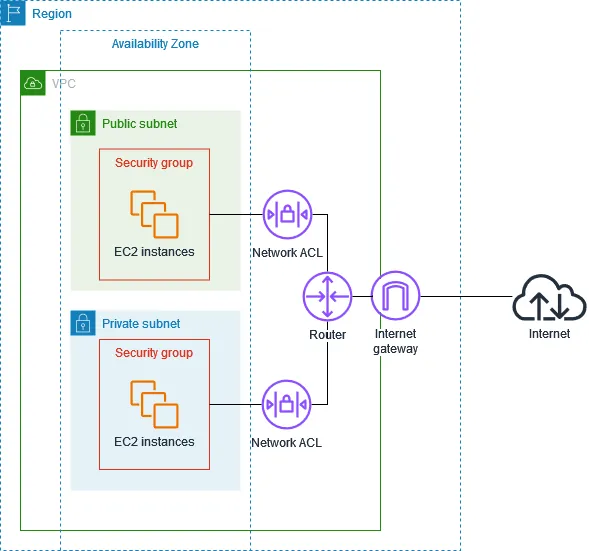
Source: AWS — Infrastructure security. AWS draws EC2 instances here; the same distinction applies to our ALB’s interfaces. These are logical filtering points, not extra servers.
At the subnet boundary: may this packet enter?#
The subnet’s network ACL, NACL (network access control list) checks the incoming packet’s source address, protocol, and destination port. For this website, the public subnet must permit incoming TCP 443 from customers.
NACL rules are numbered allows or denies. AWS checks the lowest number first and stops at the first match. A matching deny stops the packet here—even if the ALB’s own rules would allow it.
This is a rule for the subnet crossing, not permission to use every resource inside. Every subnet has an associated NACL. The default allows traffic; a newly created custom NACL initially denies it. NACL rules and associations
At the resource’s interface: may this caller connect?#
Passing the subnet check is not enough. The ALB’s security group, SG (a firewall associated with its network interfaces) must also allow incoming TCP 443.
This is where I distinguish resources sharing a subnet. Two app instances could sit side by side, yet accept different callers through different SGs. An SG filters connections from other subnets and the internet too; it is not just a same-subnet control.
SGs contain allow rules, with no explicit deny. All attached groups contribute their allowances. If any group opens a port broadly, another narrow group cannot cancel that permission. Security-group rule behavior
At the listener: is a program accepting this connection?#
With both filters permitting the traffic, the ALB still needs an HTTPS listener on 443. Allowed network traffic does not create a listening service.
flowchart TB
    B[Browser] -->|TCP 443| G[Internet gateway]
    G -->|Route to ALB| N
    subgraph P[Public subnet]
    N[NACL: admit packet] -->|TCP 443 allowed| S
    subgraph R[ALB resource]
    S[SG: admit caller] -->|Connection allowed| L[HTTPS listener: 443]
    end
    end
    style P fill:transparent,stroke:#777e88,stroke-width:2px
    style R fill:transparent,stroke:#3178c6,stroke-width:2px
    linkStyle 0,1,2,3 stroke:#2f9e68,stroke-width:2px
classDef default fill:#3178c612,stroke:#777e88,stroke-width:1.5px The browser’s connection ends at the ALB. The ALB opens a new connection to the private app on 8443. That connection must pass the ALB’s outbound SG rules, the public subnet’s outbound NACL, the app subnet’s inbound NACL, and the app’s inbound SG rules.
I give each destination the callers its job requires:
| Destination SG | Allowed source | Destination port |
|---|---|---|
entrance-sg | Any customer: 0.0.0.0/0 | TCP 443 |
shop-sg | ALB interfaces: entrance-sg | TCP 8443 |
orders-db-sg | App interfaces: shop-sg | TCP 5432 |
I permit the corresponding outbound connections too. The app must listen on its private interface; leaving it bound only to 127.0.0.1 would still prevent the ALB from reaching it. An SG reference follows associated interfaces—it does not authenticate a process or inherit that group’s rules.
On the way back: does permission cover the reply?#
Now the app queries PostgreSQL. It chooses a temporary client port, say 51000, and connects to database port 5432. PostgreSQL’s reply goes back to 51000, not 5432.
A security group is stateful: it uses connection tracking to recognize response traffic and automatically permits it, regardless of rules in the reverse direction. This applies to replies for an allowed connection—not unrelated new connections.
A NACL is stateless: it evaluates each packet independently. Both request and response directions need matching allow rules. For this database request, allowing inbound 5432 does not automatically allow the outbound reply to 51000.
sequenceDiagram
    participant A as App :51000
    participant N as DB subnet NACL
    participant D as Database :5432
    A->>N: Request to 5432
    N->>D: Inbound rule allows
    D-->>N: Reply to 51000
    N-->>A: Outbound rule must allow
The app subnet must also allow the request out and the reply back in. That is why copying an inbound NACL rule into the outbound direction can still leave a connection timing out. Return-port examples
Read the route and firewall rules together#
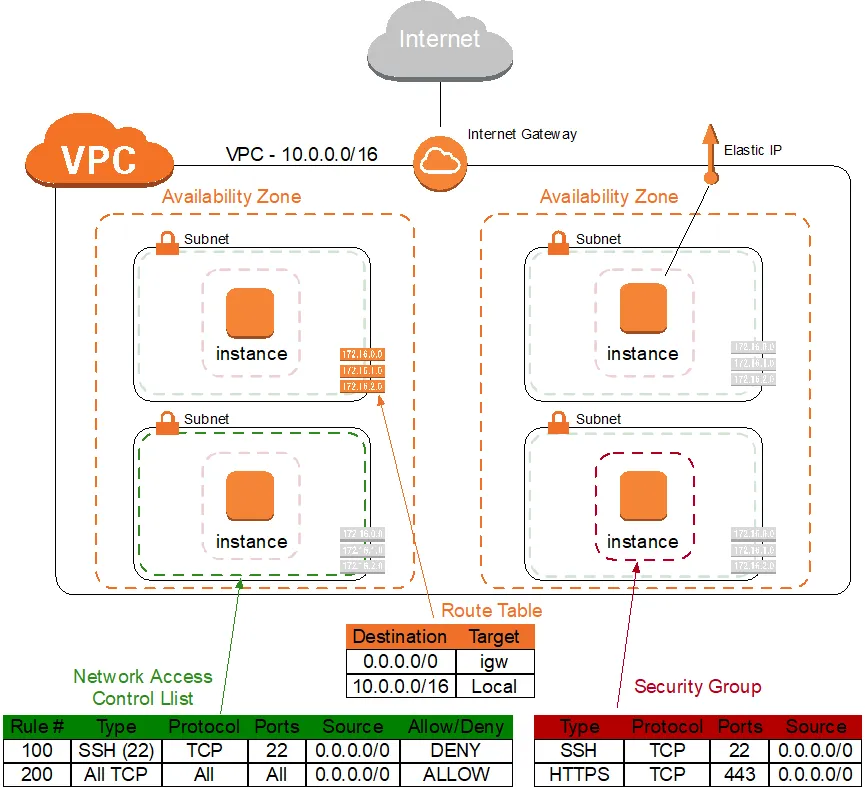
Source: AWS — Amazon VPC for On-Premises Network Engineers, Part 1.
The route table chooses the path. The NACL filters traffic crossing the subnet boundary. The security group controls connections at the resource’s network interface. Follow the rules below to see why a route and one allow rule are not enough.
| Read this part of the image | What follows |
|---|---|
Route: 0.0.0.0/0 → igw | This subnet has an internet route. It does not grant permission. |
| NACL: rule 100 denies TCP 22 before rule 200’s broad allow | An incoming SSH packet is denied at that subnet boundary. |
SG: TCP 22 allowed from 0.0.0.0/0 | This allowance cannot override that NACL deny. I would not copy this public SSH rule into our shop. |
The reply must pass the subnet’s return-direction NACL rules too; the SG recognizes it as part of the allowed connection.
With the journey in view, the comparison is smaller:
| Question | Subnet NACL | Resource SG |
|---|---|---|
| What boundary is checked? | Entering or leaving the subnet | Traffic to/from associated interfaces |
| How are rules evaluated? | First numbered match: allow or deny | Combined allowances; no explicit deny |
| Does it remember an allowed connection? | No; replies need rules | Yes; replies are automatically permitted |
| Does it filter same-subnet traffic? | No subnet crossing, so no check | Yes |
I use SGs for the app’s normal caller-by-caller restrictions. Restrictive NACLs add subnet-wide controls when required. A route provides a path; passing one filter never overrides a denial at another.
Choosing real return-port rules
51000 is one example, not a port all clients use. Restrictive NACLs need the actual clients’ ephemeral-port ranges (ports selected temporarily for outgoing connections). For the app/database flow, configure both subnets’ request and return directions. The browser/ALB and ALB/app connections likewise need their own NACL allowances; their client ports are independent.
Follow one order through the boundaries#
I use Route 53 (AWS’s DNS service) to point example.com at the ALB with an alias record. ACM (AWS Certificate Manager) supplies the domain certificate for the HTTPS listener.
I register our app instances in the target group on HTTPS 8443. The ALB periodically requests /health/ready on that port: a health check that our app must implement. Registering targets and passing these checks makes them eligible for traffic; sharing a subnet does not. ALB DNS, HTTPS setup
sequenceDiagram
    participant B as Browser
    participant L as Public ALB
    participant A as Private shop app
    participant D as Private orders DB
    B->>L: HTTPS 443: GET /orders/42
    L->>A: Separate HTTPS 8443
    A->>A: Authenticate and check access
    A->>D: SQL 5432: fetch allowed order
    D-->>A: Order data
    A-->>L: HTTP response
    L-->>B: HTTPS response
The browser never connects to PostgreSQL. The app queries it, checks order ownership, and returns an HTTP response. The public interface can provide data without exposing the database interface.
If the page uses JavaScript to fetch orders, it calls a public URL such as https://example.com/api/orders/42, through the ALB. The JavaScript runs on the customer’s laptop; serving it from our website does not put it inside our VPC. The API is publicly reachable, while the app instance stays privately addressed. Authentication and order-ownership checks decide which data that API returns.
These are separate connections. TCP’s three-way handshake establishes the connection; TLS (the security protocol used by HTTPS) then negotiates encryption and server authentication. The ALB terminates the browser’s TLS and starts a separate backend connection. Our backend HTTPS encrypts that leg, but ALB does not validate target certificates. Backend TLS behavior
Traffic crossing into the shop system is north–south; calls between its components are east–west. The database request is outbound at the app and inbound at the database. “Outbound” means leaving the named resource, not necessarily going to the internet.
What the two-zone drawing does not guarantee
I deploy app capacity in both zones. For PostgreSQL, I choose an RDS Multi-AZ DB instance (a primary database with a standby in another zone), disable public accessibility, and select a DB subnet group (eligible database subnets) spanning both zones. A second subnet alone does not create a database replica. The app connects through the database DNS endpoint and must recover connections after failover. RDS private networking
Health checks are not security rules. If all targets are unhealthy, ALB can route to them all. I still need enough surviving capacity, backups, and tested recovery. ALB target health
Private services still need to call outward#
The app sends order emails through an external provider. It needs an outbound internet connection; it still needs no public inbound address.
A public NAT gateway (outbound address translation) provides that IPv4 path. For the zonal design, I place one in each public subnet and give each app subnet a default route to the NAT in its own zone. NAT has an Elastic IP (a reserved public IPv4 address); the public subnet routes onward through the internet gateway.
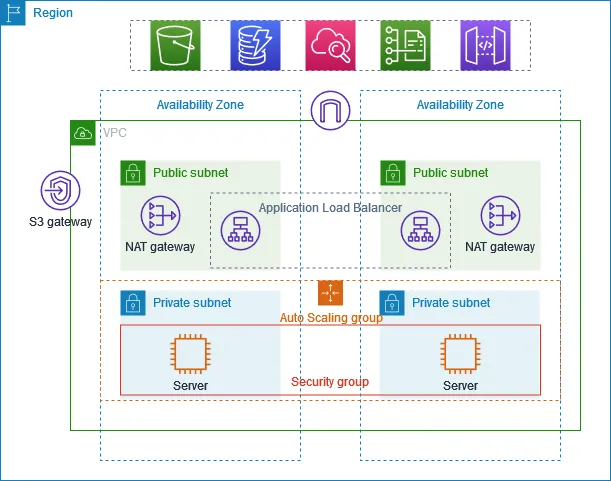
Source: AWS — Private servers with NAT. The diagram’s Auto Scaling group manages server count; it does not define another subnet.
flowchart LR
    A[Private shop app] -->|Start HTTPS| N[Public NAT]
    N -->|Translated source| G[Internet gateway]
    G -->|HTTPS 443| P[Email provider]
    P -.->|Reply mapping| G
    G -.->|Reply mapping| N
    N -.->|Return to app| A
    linkStyle 0,1,2 stroke:#3178c6,stroke-width:2px
    linkStyle 3,4,5 stroke:#2f9e68,stroke-width:2px
classDef default fill:#3178c612,stroke:#777e88,stroke-width:1.5px NAT tracks the outbound mapping so replies return to the caller. It does not admit unsolicited internet connections or inspect whether outbound data is confidential. I keep the database subnets without a default internet route and restrict app egress to required dependencies. Domain-based restrictions need an appropriate proxy or firewall; SGs do not accept arbitrary domain names. NAT properties
For AWS services, a VPC endpoint (private connectivity to a supported service) can avoid NAT. An S3 gateway endpoint adds a service route; interface endpoints create private interfaces with SGs. S3 remains outside my VPC, and permissions still apply. Endpoint choice, NAT traffic, and redundant gateways all affect cost. Gateway endpoints, Interface endpoints
A report worker needs fewer privileges than the app#
The reporting team adds an export worker. It requests approved summaries from an internal app API and writes report files to S3 (AWS’s object storage), in a bucket (a named container for files and their access rules). It does not need SQL access to the orders database.
That is microsegmentation (restricting communication between individual workloads): report-sg may reach shop-sg on 8443, but has no allowed path through orders-db-sg. The worker has no database credentials. I block the internal API path on the public ALB and separately authenticate and authorize the worker in the app.
flowchart LR
    W[Report worker] -->|Summary API 8443| A[Shop app]
    A -->|SQL 5432| D[(Orders DB)]
    A -->|Approved summary| W
    W -->|PutObject HTTPS| S[Report bucket]
    W -.->|Direct SQL blocked| D
    linkStyle 0,1,2,3 stroke:#2f9e68,stroke-width:2px
    linkStyle 4 stroke:#d64545,stroke-width:2px
classDef default fill:#3178c612,stroke:#777e88,stroke-width:1.5px Segmentation separates broader groups such as tiers or environments. Neither term is an AWS product name. A separate subnet is useful when workloads need different routing or subnet-wide rules; different SGs can distinguish workloads in the same subnet. Sharing one machine/interface needs additional process or workload isolation. The purpose is to limit lateral movement (a compromised component reaching other components), not to assume everything inside the VPC is trusted.
For performance, I run the worker on separate compute and bound its concurrency. For security, I restrict its connections and credentials. Those solve different problems.
An IAM role (an AWS identity with permissions and temporary credentials) lets this worker write only the intended S3 report prefix (the beginning of stored file names, such as reports/). SGs cannot grant an S3 action; IAM cannot make a missing network route appear.
| Question | Control in this design |
|---|---|
| Can the worker connect to the app on 8443? | Route, NACL, and SG |
| May it request an order summary? | Internal API authentication and authorization |
| May it write this report object? | IAM and applicable S3 policies |
| May it administer the AWS database resource? | IAM, separately from SQL login permissions |
S3 is an AWS service; our report bucket is a resource created in it. The bucket has storage policies, not a security group. An S3 object ACL grants storage access; it is unrelated to a NACL. New buckets default to Bucket owner enforced ownership, which disables object ACLs. S3 ownership and ACLs
The database is private. How does my team get in?#
The shop can reach its database inside the VPC. My laptop cannot: knowing the private IP and password does not give my home network a route there. I need an approved private connection, without adding a public address to the database.
For everyday development, I create a separate account and VPC, 10.70.0.0/16, with test data. Access to this network does not grant access to production.
Connect the office network first#
Being in the company office grants no automatic AWS access. The network team must connect the office to the intended VPC, configure routes in both directions, and allow the required traffic through its firewalls and the VPC’s controls.
One option is a Site-to-Site VPN (an encrypted tunnel between networks). The office gateway connects to an AWS VPN gateway; approved office traffic can then reach private VPC destinations. The VPC is the network containing our resources; the VPN supplies a connection into it. AWS Site-to-Site VPN
Give remote staff an authenticated path#
At home, I have two possible arrangements. I can join the company VPN and use its configured onward connection to AWS. Or I can use AWS Client VPN (AWS-managed remote access) connected to the approved VPC. They are alternatives, not two VPNs every developer must install.
flowchart TB
    O[Office laptop] -->|Office network| C[Company network]
    H[Remote laptop] -->|Company VPN login| C
    C -->|Site-to-Site VPN| G[AWS VPN gateway]
    H -->|Client VPN login| V[AWS Client VPN]
    subgraph D[Development VPC]
    F[Routes and resource filters] -->|Allowed TCP 5432| B[(Development DB)]
    end
    G -->|Configured routes| F
    V -->|Authorized routes| F
    style D fill:transparent,stroke:#777e88,stroke-width:2px
    linkStyle 0,1,2,3,4,5,6 stroke:#2f9e68,stroke-width:2px
classDef default fill:#3178c612,stroke:#777e88,stroke-width:1.5px A VPN endpoint can accept authentication attempts over the internet while the database remains privately addressed. The internet carries the encrypted tunnel; it does not gain direct access to the database inside it. A company VPN configured only for unrelated office tools would not magically reach our VPC.
For our remote developers, I configure AWS Client VPN for the development VPC and authorize only their required destinations. Onboarding gives the developer a client configuration and an approved authentication method. Connecting establishes the tunnel; access still depends on the configured routes and permissions. Client VPN setup and access
sequenceDiagram
    participant L as Developer laptop
    participant V as Client VPN
    participant D as Private dev DB
    L->>V: Authenticate and establish tunnel
    V-->>L: Private routes with split tunneling
    L->>D: TCP 5432 through VPN
    Note over L,D: VPN authorization, NACLs and SGs must allow it
    L->>D: Database TLS and login
D-->>L: SQL grants decide permitted actions The laptop also needs DNS that resolves the private database name. A developer may pass every network check and still be refused by PostgreSQL—or receive read-only SQL access. Production requires its own approved path and credentials. Office location, employment, and VPN login are not blanket trust.
Source addresses, dedicated links, and shell access
For IPv4 Client VPN subnet associations, source addresses are translated. Resource SG rules can reference the VPN association’s SG; I do not assume the database sees my home IP. Client VPN resource access
If the requirement is to avoid an internet-carried connection entirely, Direct Connect provides dedicated connectivity; encryption remains a separate design decision. AWS connectivity options
My deployment pipeline obtains a scoped IAM role and calls AWS deployment APIs. For human shell access, I can use Systems Manager Session Manager. Its software agent on the instance makes outbound connections to AWS; IAM controls who can open a session. This needs the agent, an instance role, and service connectivity, but no public inbound SSH port. Session Manager
Turn the network drawing into a running shop#
I first build this in the development account with test data. The dependency order is concrete:
| Create or configure | What it gives the next step |
|---|---|
| VPC, subnets, routes, and SGs | Places and permitted paths for the servers |
| Outbound connectivity and instance IAM roles | A way to fetch the app, secrets, and required AWS services |
| Private RDS PostgreSQL | A database DNS endpoint, port, and SQL login |
| App instances in the private app subnets | Running shop code listening on HTTPS 8443, with a backend certificate and /health/ready |
| Domain certificate, target group, and public ALB | Validate domain ownership for ACM; attach the issued certificate to listener 443 and forward to registered apps on 8443 |
| DNS record pointing the domain at the ALB | A browser can find the shop and open it over HTTPS |
Creating EC2 does not install my application. My deployment process must deliver it, start it, and configure its database endpoint. I use the RDS hostname, not a copied IP, and configure the PostgreSQL client to verify TLS. The application gets a limited SQL account, not the database administrator login. RDS connections
I store that password in Secrets Manager (AWS’s secret storage). The app’s IAM role can retrieve that specific secret; its network still needs a path to the service. Knowing how to retrieve the password and being allowed to connect to PostgreSQL are separate requirements. Retrieving secrets
Before launch, I check both directions of the promise:
| Test | Expected result |
|---|---|
Customer opens example.com | Shop responds through the ALB |
| Home laptop tries database port 5432 directly | No connection |
| Shop queries the orders database | Allowed network path and valid SQL access |
| Report worker tries the database | Blocked |
| Developer on approved VPN queries development data | Allowed only with valid database credentials |
| Same developer tries production without approval | Refused |
The connection failed: which boundary should I inspect?
| Symptom | What it tells me to investigate |
|---|---|
| Hostname cannot resolve | DNS configuration, including the VPN’s private DNS |
| TCP connection times out | Routes, SGs, NACLs in both directions, and whether the destination is available |
| Connection is refused | A reachable endpoint rejected it: check the listening process, address, port, and host firewall |
| TLS certificate error | Domain name, certificate trust, and TLS configuration |
| PostgreSQL rejects the login or SQL statement | Database authentication or SQL grants; opening more network ports will not fix them |
These are clues, not unique diagnoses. I test from the actual caller—the app instance or VPN-connected laptop—and check logs at the failing boundary.
AWS operates the underlying infrastructure. With EC2, my team still patches the guest operating system, updates application dependencies, and configures access. Managed services such as RDS take over more maintenance, but my team still owns its data and access decisions. This is the shared responsibility model (AWS and the customer secure different parts). AWS responsibility boundaries
A passing connection test is only part of launch readiness. I also need tested restores, deployment rollback, monitoring, and a cost estimate. ALBs, NAT gateways, and databases can incur charges while the shop is idle; I remove unused development resources.
More teams need deliberate connections, not a shared master key#
I keep the app’s tiers in one production VPC. A separate product or environment may deserve another account and VPC because different teams own its permissions and changes. A VPC is a network boundary; an account is also an ownership and cloud-permission boundary.
If a separate analytics VPC needs our summary API, VPC peering (private routing between two VPCs) can supply connectivity. It requires non-overlapping addresses, routes in both directions, and matching security rules. DNS and API authorization still need configuration. Peering does not automatically chain through a third VPC. Peering requirements
flowchart LR
    subgraph P[Production VPC]
    A[Shop summary API]
    end
    subgraph R[Analytics VPC]
    J[Analytics job]
    end
    J -->|HTTPS over peer| A
    A -->|Summary response| J
    style P fill:transparent,stroke:#777e88,stroke-width:2px
    style R fill:transparent,stroke:#777e88,stroke-width:2px
    linkStyle 0,1 stroke:#2f9e68,stroke-width:2px
classDef default fill:#3178c612,stroke:#777e88,stroke-width:1.5px PrivateLink: share the summary service privately. If analytics needs only this API, I can offer it through AWS PrivateLink. Analytics creates an interface endpoint (private network interfaces in its own VPC) to reach my endpoint service. Peering provides network-to-network routing; this PrivateLink connection exposes the selected service without peering the VPCs. Endpoint access and API authorization still need rules. AWS PrivateLink
For this custom service, I put a Network Load Balancer, NLB (a connection-level load balancer) in front of the summary API and use it for the endpoint service:
flowchart LR
    subgraph C[Analytics VPC: consumer]
    J[Analytics job] -->|HTTPS request| E[Interface endpoint]
    end
    subgraph P[Production VPC: provider]
    N[NLB] -->|Forward to API| A[Summary API]
    end
    E -->|PrivateLink| N
    style C fill:transparent,stroke:#777e88,stroke-width:2px
    style P fill:transparent,stroke:#777e88,stroke-width:2px
    linkStyle 0,1,2 stroke:#2f9e68,stroke-width:2px
classDef default fill:#3178c612,stroke:#777e88,stroke-width:1.5px At larger scale, Transit Gateway provides a routing hub. In a hub-and-spoke layout (networks connect through a shared center), many VPCs and office networks connect through it instead of maintaining many pairwise peering links. Its route tables still decide which networks may reach each other. AWS Transit Gateway
Multitenancy (one platform serving several customers) is another boundary: an SG does not know which customer owns an order. If two businesses use the shop platform, their requests may reach the same app and database. Each query must still be limited to the authenticated customer’s records. A customer-specific subnet would not enforce that rule inside a shared process; stricter requirements can justify dedicated resources or accounts. Account boundaries
Who maintains the boundaries across a growing company?#
The shop now has several teams deploying into different accounts. One team opens a database port while debugging; another launches a public endpoint without its HTTP protection rules. The architecture drawing has not changed, but the deployed network has.
A network-security team owns the company’s baseline (rules every applicable system must follow). Application teams configure their services within it. Exceptions need an owner, a reason, and an expiry—not a permanent “temporary” rule.
| Company requirement | Where I enforce it |
|---|---|
| Order databases accept only approved callers | Resource security groups |
| A prohibited address range must be blocked at selected subnet boundaries | NACL deny rules |
| Public shop endpoints receive HTTP attack filtering | Web Application Firewall (WAF) rules at the public entry |
| Private workloads contact only approved external destinations | Egress firewall or proxy, with routes forcing traffic through it |
The baseline protects private networks too. A compromised report worker is already inside the VPC; its access must still stop at the boundaries we designed.
A network policy expresses an intended rule: “only the shop may connect to the orders database.” SGs and NACLs enforce packet rules. WAF rules inspect HTTP. IAM policies govern cloud actions. There is no single policy object that answers all three.
I also protect the allowed public path. AWS WAF works at the HTTP layer: its rules can inspect paths, headers, query strings, and request bodies within inspection limits before requests reach the app. A rule might block a known SQL-injection pattern in a search parameter. WAF request inspection
DDoS (distributed denial of service) attacks flood a system from many sources to exhaust bandwidth or processing capacity; AWS Shield provides DDoS protection, while WAF can also help against HTTP request floods. Rate limits at the public entry protect shared capacity; application limits enforce rules such as “this customer may start five reports per hour.” Neither replaces parameterized SQL, ownership checks, or sufficient capacity. AWS DDoS protection
I keep the configuration in infrastructure as code (reviewable resource definitions). The security team also checks for drift (deployed rules differing from the approved configuration), including changes made outside the deployment pipeline.
AWS Firewall Manager can manage supported policies across selected accounts and resources, including newly added ones within scope. It can report violations or automatically remediate them, depending on configuration. It does not decide our company’s security requirements. Supported policies, Policy scope
The control plane (configuration management) maintains the rules; the data plane (live traffic handling) applies the installed rules to traffic.
flowchart LR
    I[Company baseline] -->|Read intent| C[Policy manager]
    C -->|Inspect rules| A[AWS account APIs]
    A -->|Actual config| C
    C -->|Apply differences| A
classDef default fill:#3178c612,stroke:#777e88,stroke-width:1.5px A bad policy can break many services at once. I test changes on a small scope before expanding them.
Suppose my policy manager updates ten accounts: five succeed, three time out, one is throttled (AWS asks it to slow down), and one target resource no longer exists. A timeout leaves the outcome unknown; the rule might already be installed. I compare actual state with the latest approved policy, then retry only missing changes idempotently (repeating the operation has the same intended effect), with delays after throttling. I flag the missing resource and reject retries for superseded policy versions, so an old job cannot restore an outdated rule.
I verify the resulting rules and alert on unresolved differences. CloudTrail records configuration actions, VPC Flow Logs provide network traffic records, and application audit logs capture user actions.
An open website is intentional. An open database port is not. What happens if tomorrow’s deployment accidentally adds one?
Comments
Signed in with GitHub. Be kind.